Product pages
The default page, custom product pages and optimization tests, each a set of screens in an order.
A product page is a set of screens in an order. Pages (Command-2) lists them all, each with its state in App Store Connect:
- the default page: what everyone sees, the screens on the default page in Design;
- custom product pages (up to 70): pages for an ad, a campaign or a search, with their own screens, text and deep link;
- optimization tests: treatments of the default page that App Store Connect shows to part of the traffic, up to three per test.
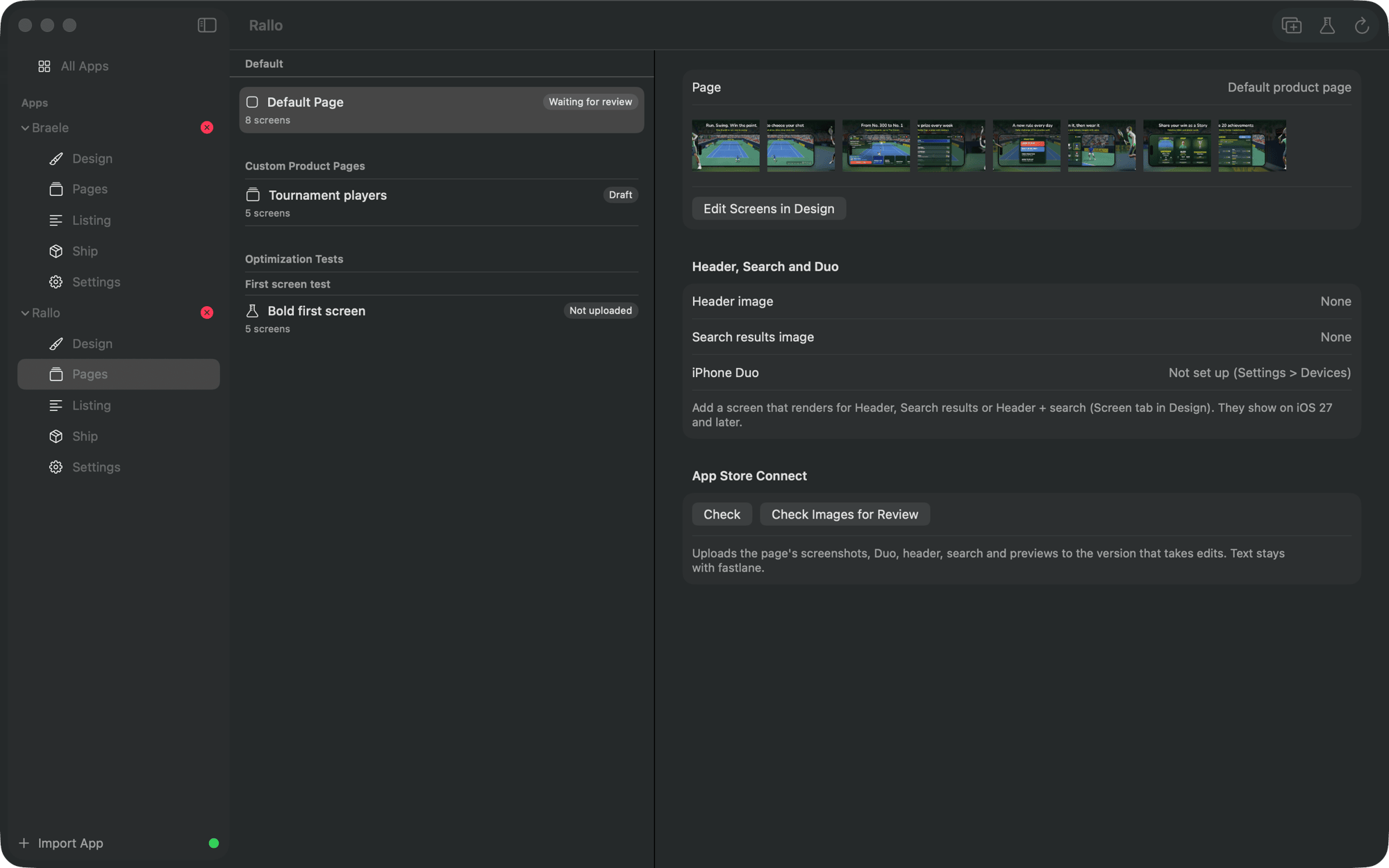
Make a page with New Custom Page or New Treatment, here or from the page menu in Design.
A page's screens
A page shows its own screens in its own order. In Design, pick the page in the toolbar, then:
- move screens to reorder them for this page;
- right-click a screen for Remove from This Page, or Add to This Page for one the page leaves out, including screens the default page does not show;
- Edit Screens in Design in Pages jumps there.
The default page's order and layout are untouched by what a page does.
Generating a page
Generate renders every page with the default one. A page's files go to
store/generated/sets/<page>/<locale>/, numbered from 01. On the command line:
store-shots generate --set summer # one pageUploading a page is a draft in App Store Connect; see pages and treatments.